
I created a photobook of me and my maid of honor using mixbook. I hadn't heard of this photobook company until one of the nesties posted about it. It's a little different than the other digital photobooks because it allows you to make collaborative books, get pictures from various online sources, and creates a "scrapbook" feel. I decided to give it a try in my quest to find the best digital photobook. After signing up for mixbook, they e-mailed me a code for a buy-one-get-one-free book, so I thought this would be great since I could give her one and keep one for myself.
Mixbook is online editor, so there is no software to download (yay!). As I mentioned earlier, you can get pictures from various online sources, including Facebook. You can even grab pictures from your friend's album. I tried this, but the resolution on most of the pictures was not high enough. However, you can also get pictures from Picasa, SmugMug, etc., so those photos will most likely be higher resolution. I haven't tried the collaboration feature, but that could be fun if you're not a control freak like me.
The templates are pretty cool. I'm a scrapbooker, so I loved all the different layouts and embellishments. It's a little hard to scroll through all the available options since it isn't really organized, and it took me a while to understand how to use and place the items. I love the pre-made templates...I got a professional looking book without much work! If you are more creative, you can start from scratch...just like a real scrapbook!
They have both square and rectangle books. I went with a 8.5"x8.5" album for this one to match the Shutterfly album I made as my "Will You Be My Maid-of-Honor?" book. It cost $29.99 for 20 pages, then $1.00 for each additional page. The classic rectangular books are similar in price. There is also the option for a soft cover which is a great option at $12.99.
The only downside for me was the shipping (not sure if this is because it is to Hawaii or if it is the same for everyone). If I ship USPS Media Mail, I have to wait about a MONTH to get my book! The next option, 2-day air will cost me about $30 for one book. I opted for the $7 USPS Media Mail, so I won't be able to post a review about the actual quality of the book until then. For now, here is a link to the online version of the book:
http://www.mixbook.com/photo-books/wedding/me-and-my-maid-of-honor-4745648
Showing posts with label Misc. Show all posts
Showing posts with label Misc. Show all posts
Sunday, April 4, 2010


Friday, April 2, 2010
Photobook - Picaboo
A fellow knottie posted a coupon code for a free large album on Picaboo, so I decided to take advantage of it and create a photobook of our Seattle engagement pictures.
I downloaded the software to my computer and chose the pictures that I wanted to add to the album. The software was easy to use, but I little slow and clunky at times. There were a variety of pre-set layouts, and you are able to add/move/delete things around as you please. You aren't able to automatically create a panoramic spread, but it is possible with some outside manipulation. The fonts are a little limited, unlike MyPublisher, where I could use any font on my computer. I really liked the ability to change the brightness and contrast of pictures and easily turn them black-and-white or sepia. My favorite feature is that you can make your own pictures background images for your page. There is also a large number of background images that come with the software.
The product pricing is okay. I got my album for free (just paid $8.99 shipping), but the regular price of the album is $39.99. They have other album types, but they can get pricey. I am interested in trying the flush-mount album because it offers thick, lay-flat pages, but those start at $349.99. I'm not ready for that investment yet.
The quality of the book was okay. I thought MyPublisher was better, but that was also a much more expensive album. These pages were not as thick and didn't have a "rich" feeling to it. I also preferred the silky-matte finish of the MyPublisher cover to the high-gloss finish of the Picaboo album. I am interested to see how the $26.99 "classic" MyPublisher album compares to this one.
Here is a link to view the book I created in Picaboo:
http://app.picaboo.com/WebView/Project.aspx?clientID=b77e7864-39d1-6936-2590-a6d53f7281fe
I downloaded the software to my computer and chose the pictures that I wanted to add to the album. The software was easy to use, but I little slow and clunky at times. There were a variety of pre-set layouts, and you are able to add/move/delete things around as you please. You aren't able to automatically create a panoramic spread, but it is possible with some outside manipulation. The fonts are a little limited, unlike MyPublisher, where I could use any font on my computer. I really liked the ability to change the brightness and contrast of pictures and easily turn them black-and-white or sepia. My favorite feature is that you can make your own pictures background images for your page. There is also a large number of background images that come with the software.
The product pricing is okay. I got my album for free (just paid $8.99 shipping), but the regular price of the album is $39.99. They have other album types, but they can get pricey. I am interested in trying the flush-mount album because it offers thick, lay-flat pages, but those start at $349.99. I'm not ready for that investment yet.
The quality of the book was okay. I thought MyPublisher was better, but that was also a much more expensive album. These pages were not as thick and didn't have a "rich" feeling to it. I also preferred the silky-matte finish of the MyPublisher cover to the high-gloss finish of the Picaboo album. I am interested to see how the $26.99 "classic" MyPublisher album compares to this one.
Here is a link to view the book I created in Picaboo:
http://app.picaboo.com/WebView/Project.aspx?clientID=b77e7864-39d1-6936-2590-a6d53f7281fe
Friday, March 26, 2010
Photobook - MyPublisher
I am on a quest to try out all of the photobook companies out there. My photographer's package didn't come with an album, so I am planning on designing my own. Ideally I would like to find a flush-mount album with metallic pages, but it is difficult for brides to do this because many album companies will only work with professional photographers. In case I'm not able to do this, I'm planning on doing a "coffee-table" book, but I'm on the search for the best company to use. I've decided to do mini-albums at each of the various companies to test ease-of-use, layout options, price, and quality.
The first company I tried was MyPublisher. They offer a 20% discount if you go through the Costco website. When I went to their webpage, they had a buy-one-get-one-free offer for new customers (but it didn't work in conjunction with the 20% off). I decided to take advantage of this offer and made a parents' album for our parents.
SOFTWARE: I downloaded the software and decided to go with the "deluxe" book, which is 15" wide by 11.5' high. It is printed on premium 182-pound high-gloss archival-quality paper, which is 75% heavier and thicker than the best paper used by any competitor (according to their website). I would suggest narrowing down the pictures you want to use for your album before adding them to the software, as it can take a while. Once it is loaded, all of your pictures are shown at the top of the window and the book is shown below. You simply select the template you want to use then drag the pictures onto the page. The software is pretty intuitive and easy to use. It ran a little slow on my computer, though. It took me almost a full day to create my book.
LAYOUTS: The layouts are okay. There are nice, simple layouts organized by number of pictures per page and whether or not you want to add text. What it was missing is the ability to easily create panoramic spreads (where a picture spans two pages) and the option to adjust opacity and use your own pictures as background images. These are two options I really wanted. Of course I could always create the layout I wanted in Photoshop and simply upload the layout as a single image, but that's just a little more work and time than I wanted to spend on this project.
PRICE: I thought the album was a bit pricey. My deluxe album was 66 pages and came out to $104.49. I got another copy of the album for free using the offer provided on the MyPublisher webpage. Shipping via FedEx was $14.98. It came out to about $60 per album.
QUALITY: I thought the quality of the album was excellent. The pages felt nice and the print quality came out clear (make sure you use high-resolution images, especially with such a big book). The book is big! It is really nice, especially for the full-page spreads I created, but might be a bit big for my taste (disclaimer: I love cute, tiny things -- I'm still searching for a small 4"x4" album that I saw sampled at The Wedding Cafe).
Okay, enough talking. Click below to flip through the book I created!
 Click to view
The first company I tried was MyPublisher. They offer a 20% discount if you go through the Costco website. When I went to their webpage, they had a buy-one-get-one-free offer for new customers (but it didn't work in conjunction with the 20% off). I decided to take advantage of this offer and made a parents' album for our parents.
SOFTWARE: I downloaded the software and decided to go with the "deluxe" book, which is 15" wide by 11.5' high. It is printed on premium 182-pound high-gloss archival-quality paper, which is 75% heavier and thicker than the best paper used by any competitor (according to their website). I would suggest narrowing down the pictures you want to use for your album before adding them to the software, as it can take a while. Once it is loaded, all of your pictures are shown at the top of the window and the book is shown below. You simply select the template you want to use then drag the pictures onto the page. The software is pretty intuitive and easy to use. It ran a little slow on my computer, though. It took me almost a full day to create my book.
LAYOUTS: The layouts are okay. There are nice, simple layouts organized by number of pictures per page and whether or not you want to add text. What it was missing is the ability to easily create panoramic spreads (where a picture spans two pages) and the option to adjust opacity and use your own pictures as background images. These are two options I really wanted. Of course I could always create the layout I wanted in Photoshop and simply upload the layout as a single image, but that's just a little more work and time than I wanted to spend on this project.
PRICE: I thought the album was a bit pricey. My deluxe album was 66 pages and came out to $104.49. I got another copy of the album for free using the offer provided on the MyPublisher webpage. Shipping via FedEx was $14.98. It came out to about $60 per album.
QUALITY: I thought the quality of the album was excellent. The pages felt nice and the print quality came out clear (make sure you use high-resolution images, especially with such a big book). The book is big! It is really nice, especially for the full-page spreads I created, but might be a bit big for my taste (disclaimer: I love cute, tiny things -- I'm still searching for a small 4"x4" album that I saw sampled at The Wedding Cafe).
Okay, enough talking. Click below to flip through the book I created!
Click to viewMonday, March 22, 2010
Much Mahalos

I made my own photo thank you cards and got them printed at Costco. $14.99 for 50 cards and $5 for each additional set of 25...the best deal in town! They were ready the next day and came complete with envelopes. This is actually take 2. The first design I created had a black border around the whole card, but it didn't print right. Luckily Costco took them back, no problem.
I'm currently working on writing the thank you notes on the back, and it is taking l-o-n-g. I had really wanted to start them on the airplane of our mini-moon when I was still in wedding-planning-super-ambitious-mode, but since I wanted photo cards, I decided to wait. Now I got my photo cards but lost my ambition. I just keep reminding myself that having to write a lot of thank you cards shows how lucky we are to receive so many gifts and have so many people celebrate with us. I've got about 25 done...125 to go!
Friday, February 26, 2010
Eye Candy
I looooove detail shots. They are a great way to remember all the little decisions you made throughout the planning process. All of those months of choosing the theme colors, going to cake tastings, looking through tons of magazines, staying up all night searching the web for inspiration, and cursing myself for deciding to do my own invitations...this is what it is all about! These are the things that your guests may overlook, but that you and other knotties drool over. I admit that I was a bit worried that the results would not live up to those pictures in the magazines that I dreamt of, but they exceeded my expectations. Mr. Pug and I were both stoked at the way everything turned out!


Invitation & Rings

Rings on Our Wedding Day Newspaper

My Bouquet

My Bouquet & Shoes #1

MOH Bouquet & Shoes #2

Obligatory Dress-in-Window Shot

Groom's Gift - Custom Jordans with Wedding Date

I Went With the Purple Shoes!

My Bouquet

Detail Shot of my Dress's Neckline & Bouquet

Gazebo Florals

Orchid Aisle

Table Number, Centerpiece, and Table Tent

Table Setting, Favor Box, and Program/Menu Card

Chair Covers & Uplighting

Card Box & Guest Sign-In

Wedding Cake

1001 Folded Origami Cranes

Best Wishes from Micky & Minnie

Congratulatory Letter from President & Mrs. Obama


"i do" Letters and Mini-Pug

Friday, January 22, 2010
Making it Legal
We went down to apply for our marriage license today. I don't know why, but I had pictured the licensing office as being a lot more glamorous than it is. I guess wedding are filled with such elegance and grandeur that I was a little surprised when we got to the marriage license office and it looked like this...


Very unassuming and to the point. We sat down in the cramped office as the woman across the desk took the form we filled out and typed it into the computer (I couldn't help but think that this office could use some serious LEAN improvements to increase efficiency...those darn business school classes!). After a quick glance at our ID's, collecting our $60 (cash only!), and making us raise our right hands and swear under oath that all the information we provided was true, that was it! We walked out with marriage license in hand...we're one step closer to making it legal!
Sunday, January 17, 2010
Cranes
According to Japanese lore, folding 1,000 Origami Cranes is truly a labor of love. Tradition holds that the bride who finishes this task, called 'sembazuru', before her wedding day will be richly rewarded with a good and happy marriage. Paying homage to the magestic crane, which mates for life and is said to live one thousand years, the bride ensures her own good fortune.
In Hawaii, many brides will fold 1,001 Origami Cranes (1 for good luck) and mount the cranes to create a piece of art that can be displayed in their homes.
Mr. Pug and I originally wanted to have the crane design be his family mon (crest), but we were unable to find it. We talked about a few other ideas and ultimately decided on a circle (representing eternity), bamboo (representing strength), and the kotobuki character (representing good fortune, celebration, and longevity). We turned over our idea to the extremely talented Cathy Lancaster of Classic Cranes, and she worked her magic. We handed over 1001 origami cranes in ziploc bags, and 1-1/2 months later, this is what we got...

I couldn't be happier with the results...it is absolutely amazing! Cathy was great and I highly recommend her. Her price is also reasonable, as you pay for the framing separately. Crane mounting cost $425. The framing options we chose from Pictures Plus came out to an additional $395.
Tuesday, January 5, 2010
New Icon
The good news: someone found my blog, read it, and commented on it!
The bad news: it was someone from weddingbee.com asking me not to use their icon.
Okay, I understand, but it was just so darn cute! I hope it is still okay to use the name Ms. Pug. Anyways, without further adieu, here is the new Ms. Pug icon (and I know it's not copyrighted because it's my own adorable little furbaby!)...

The bad news: it was someone from weddingbee.com asking me not to use their icon.
Okay, I understand, but it was just so darn cute! I hope it is still okay to use the name Ms. Pug. Anyways, without further adieu, here is the new Ms. Pug icon (and I know it's not copyrighted because it's my own adorable little furbaby!)...

Wednesday, December 23, 2009
Photosharing Sites
When I first got engaged I had wanted to do the disposable cameras on each table to be sure that I got candids and other pictures that our photographer might miss. I'm a scrapbooker, so I looove photos and wanted to get as many different shots as I could. After some thought and discussions with past brides, I decided against this because:
1) The cost of the cameras and developing film
2) The quality of pictures you get with disposable cameras is not that great
3) People may not use the cameras or may leave half a roll unshot
4) Most people will have their own high-quality digital camera (and let's face it...digital is the way to go these days)
I saw some knottie bios where brides created "photosharing cards" and encouraged guests to upload the pictures from their cameras on a photosharing site.


I love this idea, but I am still not sure where to host the pictures. Here is my wishlist for the site:
1) Allows easy download of all images at full-resolution
2) Large/unlimited capacity
3) Easy to use
4) Does not require users to create an account or download any software
I've done a bit of research, but I'm still not sure which photosharing site to go with. The front runners are Flikr, Picasa, Shutterfly, SmugMug, and MobileMe Gallery.

Flikr has a Pro service for $24.95/year which would allow unlimited uploads and the ability to download images at full-resolution. Many people use and are familiar with flikr, but personally, I find it confusing and haven't quite figured out how to organize and manage my photos. Collections, sets, groups, galleries...what's the difference??? I know I could easily learn, but I am too lazy. I need something a little more intuitive, especially for my non-techie friends and family.

Picasa is a free option with a web interface as well as a program you can download onto your computer for more features. I like it because it is a part of the Google suite of products and many of my friends and family already have Gmail accounts. I know a few of my friends also regularly use the Picasa albums for their personal pictures. One thing I don't like about the Picasa site is that in order to download a full album of pictures, you will need to install the Picasa software on your computer. I have this software on my computer, but when I've tried downloading albums, it has been slow and often times I get errors and incomplete downloads.

Shutterfly has a share site feature that I really like because it will allow me to create a nice, personalized page for my guests to use. I can add notes, stories, a blog, and photobooks to the page to make it more than just a repository for photos. I also like it because I use shutterfly a lot whenever I want to print photos and create photobooks -- having the photos hosted on this site will save me the trouble of downloading from one site and uploading on another one to make prints. The downside is that you will need a shutterfly account to download images and they will not be at full-resolution. In addition, each photo will need to be downloaded individually -- there is no batch downloading feature available.

Smugmug is not a free service, but one that I've noticed a lot of professionals and serious photographers use. There is a yearly fee ranging from $40-$150/year depending on the features you want. Smugmug offers more options to view and share your pictures (like password-protected albums and the ability to disable downloads). They also allow full-resolution downloads, but you will need to download each one individually. There are third-party applications that allow you to do bulk downloads, but it looks a little confusing.

MobileMe Gallery is a program I just heard of while doing my research. It is actually part of the MobileMe software package sold by Apple for their Macs. We just bought a Mac a couple months ago with the intention of using it to create a slideshow for the wedding using the iPhoto software. Well, now that we have the Mac, this is a new option that is open to me. The software is actually quite expensive ($99/year) and it was really designed to wirelessly sync your computers and iPhone easily. The Gallery feature seamlessly interacts with iPhoto and provides easy uploads from your computer. Friends and family can easily access your albums on the web and can upload and download full-resolution pictures and albums without having to download any software. They don't need to create a user account either. You can password-protect your albums, but it is a little tricky because it must be done by creating the album in iPhoto. This is a software I haven't heard a lot about or had a lot of experience with yet, so I'm still undecided on it. I downloaded a trial version of the software and will try it out to see how it works.
Anyone have any suggestions or experience with any of these programs?
1) The cost of the cameras and developing film
2) The quality of pictures you get with disposable cameras is not that great
3) People may not use the cameras or may leave half a roll unshot
4) Most people will have their own high-quality digital camera (and let's face it...digital is the way to go these days)
I saw some knottie bios where brides created "photosharing cards" and encouraged guests to upload the pictures from their cameras on a photosharing site.


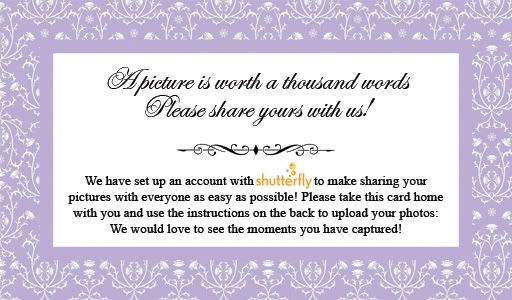
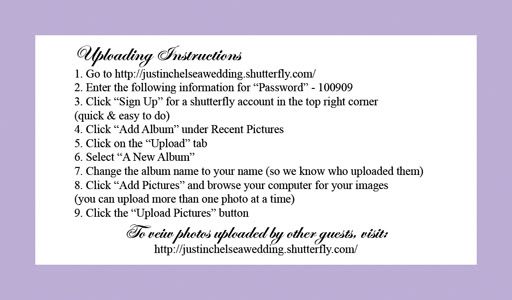
I love this idea, but I am still not sure where to host the pictures. Here is my wishlist for the site:
1) Allows easy download of all images at full-resolution
2) Large/unlimited capacity
3) Easy to use
4) Does not require users to create an account or download any software
I've done a bit of research, but I'm still not sure which photosharing site to go with. The front runners are Flikr, Picasa, Shutterfly, SmugMug, and MobileMe Gallery.




Anyone have any suggestions or experience with any of these programs?
Tuesday, December 8, 2009
An Imposter!
I logged onto the Weddingbee website today, and what did I find???

The Pug icon has been adpoted!!! I immediately went searching for her first post where she introduced herself to see if she is anything like moi. Well, turns out she is Asian, loves horrible TV shows (i.e. Girls Next Door), and (most importantly) has a little puggie just like me! She even describes herself as a "big dork"...sounding more and more like me every sentence! I guess she is worthy of the "Miss Pug" name...let's just hope I don't let us down...

The Pug icon has been adpoted!!! I immediately went searching for her first post where she introduced herself to see if she is anything like moi. Well, turns out she is Asian, loves horrible TV shows (i.e. Girls Next Door), and (most importantly) has a little puggie just like me! She even describes herself as a "big dork"...sounding more and more like me every sentence! I guess she is worthy of the "Miss Pug" name...let's just hope I don't let us down...
Saturday, December 5, 2009
Wedding Shower #1
I am very blessed and had quite a few people tell me they wanted to throw me a shower when they heard I was engaged. This allowed me to have several small showers rather than one big one. I opted for this because it would make the shower less of a financial burden for the host, and I would be able to spend more time with each of the guests. Plus I hate being the center of attention...although, I don't quite know which is worse -- being the BIG center of attention once or being a smaller center of attention four times.
 Tonight Mr. Pug's cousin threw me a shower at Pearl Country Club with all of Mr. Pug's family. I hadn't met his whole family before, so it was good to finally meet all of them. Men were included in this shower, and I'm glad Mr. Pug was there with me to keep me company and shoulder some of the attention.
We ate dinner, played games, and opened presents. Cousin Pug did a great job organizing and incorporated a lot of little details like orchids (the "theme" of our wedding), fortune cookies with personalized fortunes, and a delicious lemon crunch cake. We left with a carload of gifts and lots of food to take home. Mr. Pug and I are so lucky to have such thoughtful and generous family!
 Tonight Mr. Pug's cousin threw me a shower at Pearl Country Club with all of Mr. Pug's family. I hadn't met his whole family before, so it was good to finally meet all of them. Men were included in this shower, and I'm glad Mr. Pug was there with me to keep me company and shoulder some of the attention.
We ate dinner, played games, and opened presents. Cousin Pug did a great job organizing and incorporated a lot of little details like orchids (the "theme" of our wedding), fortune cookies with personalized fortunes, and a delicious lemon crunch cake. We left with a carload of gifts and lots of food to take home. Mr. Pug and I are so lucky to have such thoughtful and generous family!
Sunday, November 15, 2009
Registering Blues
When it comes to registering, I had a picture in my head of a happy, trigger-happy couple prancing around a store with a scan gun in hand merrily pointing it at anything and everything that me their fancy. I searched online for a picture but came up short...really, I have no idea where this picture in my head came from. Must have been a movie. Anyways, that pretty picture in my head is soooo not what registering was like for me and Mr. Pug.
 First of all, we currently live together and have all the basics. Granted, they are not the best quality and we usually eat out of paper plates and use plastic forks, but that is mostly by choice (I am too lazy to wash dishes). I would love to upgrade our dinnerware, silverware, drinkware, appliances, etc. BUT, we are currently renting a tiny duplex, and we barely have enough room for what we currently own. If only I could delay my registering until the day we find a house to buy...
So, we considered not registering. Mr. Pug actually thought only mainland people registered, not people in Hawaii. While it's true that Hawaii people generally give money for weddings, I knew that there would be some guests who might not feel comfortable with that and others that would want to buy actual things for the shower. So, if people were going to buy things anyway, I might as well let them know what we would like, right? So I decided to register for at least a few things for those who might be looking to buy us a gift.
My first problem was deciding where to register. This issue is a little harder in Hawaii because many of the big chains (Crate & Barrel, Pottery Barn, Bed Bath and Beyond, etc.) do not have stores here.
We just got a Target a few months ago, and since I love Target, I thought it would be perfect! But then I heard that returning items is difficult there, especially if you don't have a receipt. Now, I wouldn't necessarily return things that I asked for on my registry, but what if I happen to get multiples with no gift receipt. To return an item at Target without a receipt, you must exchange it for a single item of equal or greater value in the same department that the item you are returning came from. On top of that, they take all your personal information and limit you to doing this once or twice a year. I love Target, but that just sounds like too much of a hassle.
 My next choice would be Crate & Barrel or Bed Bath and Beyond, but since there are not physical stores in the state, it may be difficult for guests, especially those who don't feel comfortable buying things online. Shipping to Hawaii is also expensive.
The only other on-island places I could think of were Macy's and Williams-Sonoma. Williams-Sonoma seemed too pricey and I just wasn't thrilled about Macy's. I really wish Costco had a registry because I saw a lot of things I wouldn't mind getting there :)
Right now I'm still undecided about whether or not to register. Did you register? Where? Was it everything you dreamed it to be?
 First of all, we currently live together and have all the basics. Granted, they are not the best quality and we usually eat out of paper plates and use plastic forks, but that is mostly by choice (I am too lazy to wash dishes). I would love to upgrade our dinnerware, silverware, drinkware, appliances, etc. BUT, we are currently renting a tiny duplex, and we barely have enough room for what we currently own. If only I could delay my registering until the day we find a house to buy...
So, we considered not registering. Mr. Pug actually thought only mainland people registered, not people in Hawaii. While it's true that Hawaii people generally give money for weddings, I knew that there would be some guests who might not feel comfortable with that and others that would want to buy actual things for the shower. So, if people were going to buy things anyway, I might as well let them know what we would like, right? So I decided to register for at least a few things for those who might be looking to buy us a gift.
My first problem was deciding where to register. This issue is a little harder in Hawaii because many of the big chains (Crate & Barrel, Pottery Barn, Bed Bath and Beyond, etc.) do not have stores here.
We just got a Target a few months ago, and since I love Target, I thought it would be perfect! But then I heard that returning items is difficult there, especially if you don't have a receipt. Now, I wouldn't necessarily return things that I asked for on my registry, but what if I happen to get multiples with no gift receipt. To return an item at Target without a receipt, you must exchange it for a single item of equal or greater value in the same department that the item you are returning came from. On top of that, they take all your personal information and limit you to doing this once or twice a year. I love Target, but that just sounds like too much of a hassle.
 My next choice would be Crate & Barrel or Bed Bath and Beyond, but since there are not physical stores in the state, it may be difficult for guests, especially those who don't feel comfortable buying things online. Shipping to Hawaii is also expensive.
The only other on-island places I could think of were Macy's and Williams-Sonoma. Williams-Sonoma seemed too pricey and I just wasn't thrilled about Macy's. I really wish Costco had a registry because I saw a lot of things I wouldn't mind getting there :)
Right now I'm still undecided about whether or not to register. Did you register? Where? Was it everything you dreamed it to be?
Thursday, January 1, 2009
Engaged!
 On Christmas Day, after we had opened all of our gifts, Mr. Pug told me he thought I had one more gift. I searched under the tree and even in the tree but didn't see anything. He hinted that it might be in my stocking (the one hanging from our cardboard fireplace), and when I looked, there was a small box with a HANDMADE purple bow on it (I was very impressed). I opened the box, and as I looked at the beautiful, sparkling ring, Mr. Pug told me that he wanted to spend the rest of his life with me and asked me to marry him. I, of course, said "Yes!" We can't wait to start planning not only our wedding, but the rest of our lives together!
Subscribe to:
Posts (Atom)
